






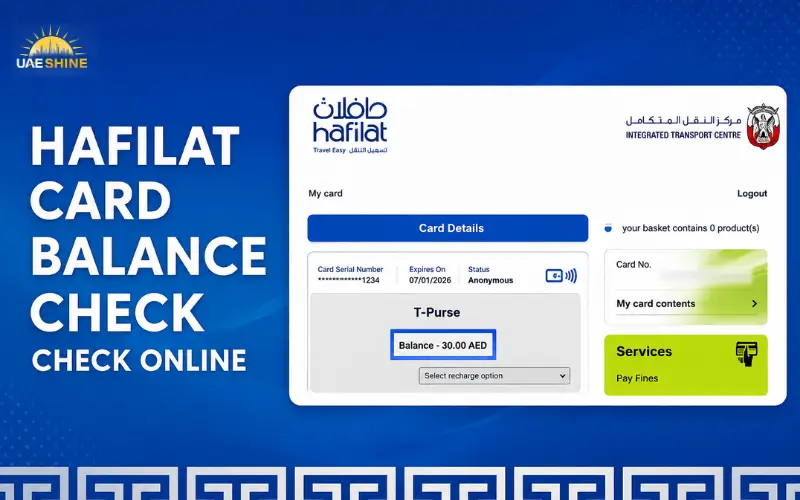
The Hafilat Smart Card is mandatory for all public transport users in Abu Dhabi to help them enjoy hassle-free and convenient travel on all bus services. The card enables passengers to pay on the bus by simply tapping it on the bus reader, and the fare will automatically be deducted from the balance on the card. Maintaining the remaining credit is essential to prevent issues when traveling and to keep things running smoothly. By using a Hafilat card balance check, users can verify their available balance, check updates on their top-ups, as well as keep proper track of their travelling expenses. For passengers using the card for various purposes – whether for work, education or their own personal needs – having a regular check on the card balance is a way of ensuring they are always prepared and have a seamless bus journey.
Hafilat Card Balance Check: What You Need to Know
Abu Dhabi’s smart card for passengers using public buses is called a Hafilat Smart Card. Money is put on the card, and the card is tapped when people get on and off buses. It automatically calculates and charges the fare for the trip.
The remainder is the balance of remaining credit for future trips. For frequent travellers, it is helpful to check regularly, as a low balance could make travel validation difficult.
The following options are enabled when you perform a balance inquiry:
- See other travel credit still available
- Confirm successful recharge transactions
- Track the daily expenditure on transportation
- Don’t have problems with balances that are too low.
- Plan future top-ups
It can also be used for transport passes, weekly or monthly, depending on the needs of the user.
How to Check Hafilat Card Balance Online
Many travelers opt to check their balances online since they don’t have to go to physical machines or customer service centers.
Typically, the online balance checking process will ask you for your Hafilat card information, and you will need to use the official online services offered by Abu Dhabi Mobility.
Steps to Check Your Balance Online
Follow these steps:
- Log on to the official service platform for Hafilat (online).
- Choose the balance enquiry.
- You can fill in your Hafilat card details.
- Submit the request.
- Check the balance and card status.
The online services are helpful for a passenger who would like to access his/her card information before travel.
Users are advised to always use official Abu Dhabi Mobility platforms; however, unofficial platforms may not offer accurate information or secure payment services.
Checking Hafilat Balance Through Machines
Hafilat recharge and ticket vending machines are also a surefire way to verify the balance on a Hafilat card.
These machines can be found at certain transport sites and can be used by passengers to:
- View remaining balance
- Recharge their cards
- Purchase transport passes
- Complete card-related services
Abu Dhabi Mobility says that Hafilat cards can be bought and recharged from sales and recharge machines, customer happiness centres, and approved partner locations.
How to Check Balance at a Machine
The steps are easy to follow:
- Find a recharge machine for Hafilat.
- Press the card on the card reader.
- Wait until the system displays the card information.
- See how much money you have left. Look at the amount of money that you have left.
This option is useful if there is no internet connection available or if the passengers would like to recharge immediately after checking their balance.
Checking Balance While Using Abu Dhabi Buses
Passengers can also view balance information on the bus validation machines when using their Hafilat card.
Tap the card for boarding and exiting to enable the system to process the journey and update the card information. Tapping the card can aid in updating if the passenger has recently added credit.
Other users have complained of problems with online recharge, and that touching their card on the reader restarted the recharge.
If passengers require specific balance information, though, they should use official checking methods and machines.
Read Also: Al Rigga Metro Station
How to Recharge Your Hafilat Card
Following a Hafilat card balance verification, passengers have to top up their cards to continue the services provided by the buses in Abu Dhabi. There are various official ways to recharge, so users can select the easiest option for them.
Abu Dhabi Mobility says that the Hafilat Smart Card can be recharged using the recharge machines, the customer service points, MBME machines, and also via the DARBI platform online.
Recharge Through Hafilat Sales and Recharge Machines
One of the quickest ways to top up credit is through the Hafilat sales and recharge machines. The machines can be found at bus stations and at certain bus stops.
The primary advantages are:
- Immediate balance update
- Quick and convenient card top-up options.
- There is no need to set up the online payment system.
- Fast confirmation following recharge
With all these machines, the new balance will show on the card as soon as you use the machine.
Recharge Through Customer Happiness Centers
There are also Customer Happiness Centers at bus stations where passengers can recharge their cards. This is beneficial for users who require extra help with their Hafilat card.
At these places, the balance is automatically updated after the recharge.
Recharge Through MBME Machines
Another convenient option for users who have access to MBME recharging machines in commercial locations is the MBME recharge machines.
MBME transactions, however, will take longer than some direct recharge machines before the balance is reflected on the card. MBME recharge balances get reflected after about 2 hours, according to Abu Dhabi Mobility.
Online Hafilat Recharge
Passengers are also able to top up their cards online via the official DARBI website.
The benefit of online recharge: Users get to recharge without having to stop by a station. Not all of the online-added balance will show up right away, though. The website recharge balances are seen after approximately two hours, according to Abu Dhabi Mobility.
Why Is My Hafilat Balance Not Updated After Recharge?
One of the most frequently encountered problems with a recharge is that the amount is not reflected when checking balances on the card after charging.
Typically, this is due to a digital recharge having been added but not yet activated or transferred to the physical card.
Common reasons include:
1. Online Recharge Processing Time
For online and some third party recharge, the balance may take some time to get credited.
The previous balance can briefly be displayed if you recharge via the website and you check your card immediately afterwards. According to Abu Dhabi Mobility, it typically takes two hours to see the online recharge balances.
2. Card Needs Activation
Some recharge methods will require passengers to insert a card into the recharging machine or Hafilat reader to adjust the amount of money on the card.
The card is used on transport readers or approved machines to synchronize pending balance information.
3. Incorrect Card Details
If the wrong card information is entered during online services, it can hinder the successful completion of the recharge transaction.
It is important to take time and review carefully before confirming payment:
- Hafilat card number
- Payment details
- Recharge amount
- Confirmation message
4. Card Validity Issues
Sometimes, there is a balance problem because of the expiration of the card or a technical problem.
It is essential that passengers monitor their card validity and how much is still left on their card regularly.
Read Also: Ousha Al Suwaidi
Hafilat Card Balance and Validity Information
It is crucial to know about the validity of a card,d as it may mean that travelling will be difficult even if you still have some cash.
The validity of a standard Hafilat card is 5 years, based on information from Abu Dhabi Mobility.
Passengers should check:
- Card expiry date
- Available balance
- Active travel passes
- Recharge history
A valid card will allow public bus travel in Abu Dhabi without interruptions.
How Much Balance Can Be Added to a Hafilat Card?
The Hafilat Smart Card can be topped up as required for the journey that passengers want to make.
Abu Dhabi Mobility says that the maximum credit that can be added to the Hafilat card is AED 150, and the recharge balance will be valid for three months from the date of recharge.
Transport passes can also be purchased for frequent travellers rather than top-ups.
There are some pass options available:
- Weekly transport pass
- Monthly transport pass
These options may be beneficial for passengers who rely on buses frequently, as they offer fixed fares.
Tips to Manage Your Hafilat Card Balance Efficiently
Appropriate transport balance management can avoid last-minute trouble on the trip.
Check Your Balance Before Travelling
People should check their Hafilat card balance before embarking on important trips, particularly long journeys or at peak times.
This helps avoid:
- Failed card validation
- Delays while boarding
- Emergency recharge situations
Recharge Before Your Balance Gets Low
You may end up with an inconvenience if you have to wait until the balance is gone. Those who commute regularly should have sufficient credit to cover their regular commuting needs.
Keep Your Card Safe
A Hafilat card stores transport information, so users should be careful not to be exposed to:
- Physical damage
- Extreme heat
- Scratches on the surface of the card.
Damage to a card can impair readers from reading it.
Use Official Recharge Channels
If possible, passengers should use the official Abu Dhabi Mobility services and approved recharge points.
Official channels offer an accurate balance update and minimize payment problems.
Common Hafilat Card Problems and Solutions
| Problem | Possible Solution |
| Balance not showing after online recharge | Wait for processing time and tap the card on a reader or recharge machine |
| Card not working on bus | Check card validity and available balance |
| Recharge completed but credit missing | Confirm transaction details and allow update time |
| Lost or damaged card | Visit an official service center for assistance |
Passengers experiencing repeated issues should contact official customer support channels provided by Abu Dhabi Mobility.
Conclusion
It is crucial to have your Hafilat card balance in check for a seamless and hassle-free travel experience. Regular checks of the balance for the Hafilat card will enable passengers to know how much credit they have and prevent them from encountering any problems in the future during their bus travels. Official checking and recharge procedures allow easy transport cost management. It is recommended to recharge the card before the balance is depleted so that the traveler doesn’t encounter any interruptions in travel. It’s also crucial to ensure the card is kept in good condition and current for frequent use. Proper balance management can make it easier and more reliable to travel on public transport within Abu Dhabi.
Read Also: Sheikh Ammar Bin Humaid Street: Location, Map, Rentals & Travel Guide
Sheikh Zayed Road, Dubai Complete 2026 Guide for Drivers, Renters, and Visitors
Frequently Asked Questions
How can I check my Hafilat card balance?
You can check his/her Hafilat card balance with the help of official online services, the recharging machines provided by Hafilat, and the card readers provided on the buses in Abu Dhabi. Checking your balance will give you an idea of how much travel credit you have before embarking on the trip.
Can I check Hafilat balance online?
Yes, you can check the balance on Hafilat online via official Abu Dhabi Mobility services and the DARBI platform. The services also enable passengers to top up their cards without going to a store.
How long does Hafilat online recharge take?
It may take some time for an online Hafilat recharge to reflect on the card. Most of the time,e the recharge amount will take up to 2 hours to show, depending on the time of recharge.
What should I do if my Hafilat recharge is not showing?
If your recharge isn’t showing up, do not panic – just wait it out and put your card on one of the approved Hafilat readers or charge machines. In case of a persistent issue, reach out tothe Abu Dhabi Mobility Customer Support team for support.
How long is a Hafilat card valid?
Usually, ly a Hafilat card lasts for 5 years after its purchase date. Passengers are advised to keep an eye on their card status and update their cards as needed to be able to use Abu Dhabi buses.
Where can I recharge my Hafilat card?
Hafilat card can be recharged by official Hafilat recharge machines, customer happiness centres, online recharge, and approved recharge channels. Official methods provide balance updates that are secure and correct.
Why is my Hafilat card not working on the bus?
If a Hafilat card does not work, this may be due to a lack of funds, card expiration, or a technical problem. Review the balance, validate the card, and call Abu Dhabi Mobility if the card is still invalid.