






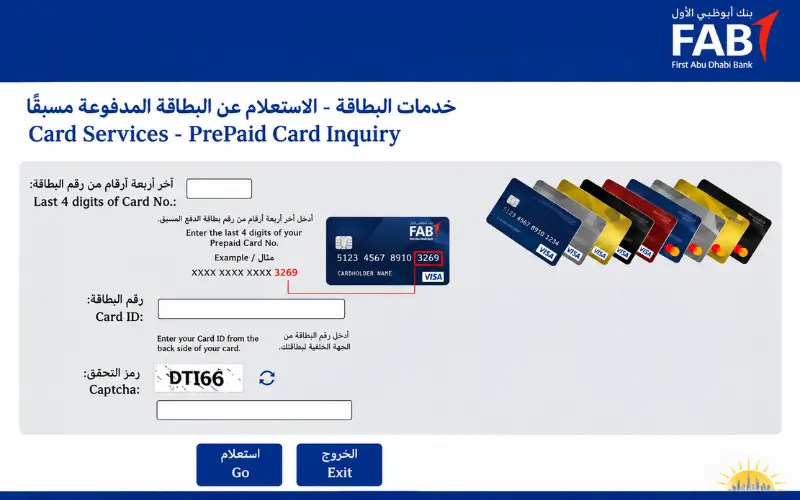
Checking the balance on an old National Bank of Abu Dhabi card can be confusing, especially since the bank now operates as First Abu Dhabi Bank (FAB). The method you need depends on the type of card you hold: regular account holders can check their funds via FAB’s mobile or online banking, while eligible Ratibi and prepaid cardholders should use the Magnati inquiry portal. Knowing which service applies to your card helps you avoid unsuccessful inquiries and ensures you can access accurate information regarding your balance.
Quick Facts
| Detail | Information |
| Former bank name | National Bank of Abu Dhabi |
| Current bank | First Abu Dhabi Bank (FAB) |
| Merger completion | 2017 |
| Regular account balance | FAB Mobile or Online Banking |
| Eligible prepaid card balance | Magnati Prepaid Cards Enquiry |
| Ratibi salary card | FAB Ratibi balance enquiry service |
| Magnati portal requirements | Last four card digits, Card ID and CAPTCHA |
| Ratibi support in the UAE | 600 522 298 |
| Ratibi support from abroad | +971 2 499 6279 |
| Official banking website | First Abu Dhabi Bank |
Is NBAD Now First Abu Dhabi Bank?
Yes. ‘First Abu Dhabi Bank‘ (FAB) was established in 2017 through the merger of the National Bank of Abu Dhabi and First Gulf Bank. This new entity has consolidated both banks under the name ‘FAB’; therefore, customers should now use FAB’s official website, mobile application, and customer support services.
The merger process began with an announcement on July 3, 2016, followed by approval from shareholders on December 7 of the same year. After the shares of the former ‘First Gulf Bank’ were delisted from the stock exchange, trading of ‘First Abu Dhabi Bank’ shares commenced on the Abu Dhabi Securities Exchange on April 2, 2017.
For former customers, the situation is straightforward: there is no longer a separate, active NBAD banking service for accessing your account. Relevant banking services are now provided through FAB, although the specific channel used still depends on the product you hold.
What Happened to Old Accounts and Cards?
Under this merger, existing customers were not required to establish a new banking relationship. Existing accounts and services became part of the combined bank, subject to the terms and conditions applicable to each specific product.
You might still see the name of the former bank on some older cards or documents. This does not imply that such cards operate on a separate banking system, nor does it mean that all legacy services remain available. Before choosing a method to check your balance, please review the details relevant to your specific product.
The main differences are between the following products:
- A current or savings account is managed through FAB’s personal banking services.
- A debit card is usually connected to a bank account, so customers can check the linked account through supported digital banking or ATM services.
- A credit card has its own balance, outstanding amount, and payment information.
- A Ratibi payroll card holds salary funds and follows a prepaid-card enquiry process.
- Other prepaid cards may use Magnati if the issuer has enabled that service for the card.
If you are unable to identify an old card or cannot verify whether it is still active, please contact FAB through its official support channels. Do not rely on old login addresses, and do not assume that a card bearing previous branding still functions according to its original instructions.
Choose the Correct Balance-Checking Method
First, identify the product you wish to obtain information about. The inquiry systems for standard bank accounts, credit cards, and prepaid salary cards may differ, even if they all bear the name or brand of the same bank.
| Product | Suitable checking method | Important detail |
| FAB current account | FAB Mobile or Online Banking | View the account balance and transactions |
| FAB savings account | FAB Mobile or Online Banking | Select the relevant savings account |
| FAB debit card | FAB Mobile or supported ATM | The card is normally linked to a bank account |
| FAB credit card | FAB Mobile or Online Banking | Check card balance and outstanding transactions |
| Ratibi payroll card | Official Ratibi/Magnati enquiry route | Prepaid salary card |
| Eligible legacy prepaid card | Magnati prepaid enquiry portal | Issuer eligibility is required |
| Corporate Ratibi payroll programme | Employer’s designated banking channel | Employer manages the payroll arrangement |
Instead of entering their bank account details into a form designed for prepaid card inquiries, a standard account holder should utilize FAB’s digital banking services. Meanwhile, a ‘Ratibi’ cardholder should use the service specifically designated for prepaid cards, rather than assuming the card will appear within their personal banking profile.
If you are unsure which product you hold, please check the name of the card and the information provided by your employer or bank. This simple verification can save you time and help you avoid recurring errors.
How to Complete an NBAD Balance Inquiry Online
Eligible prepaid cardholders can use the official Magnati prepaid card inquiry portal. Customers with regular current or savings accounts should use FAB Mobile or online banking instead, as the Magnati platform is not designed for standard bank account logins.
Step 1: Open the Official Magnati Portal
Go to the official prepaid-card enquiry page:
https://ppc.magnati.com/ppc-inquiry/
The page is titled “Prepaid Cards Inquiry” and provides a form for eligible cardholders. FAB also connects existing Ratibi users to this service via its official Ratibi product page.
Before entering any information, check the address bar to ensure that you have accessed the correct website. Search results may display third-party articles or unofficial pages that use similar banking terminology. Use the portal linked by FAB rather than submitting your card details on an unfamiliar website.
Step 2: Enter the Last Four Digits of Your Card
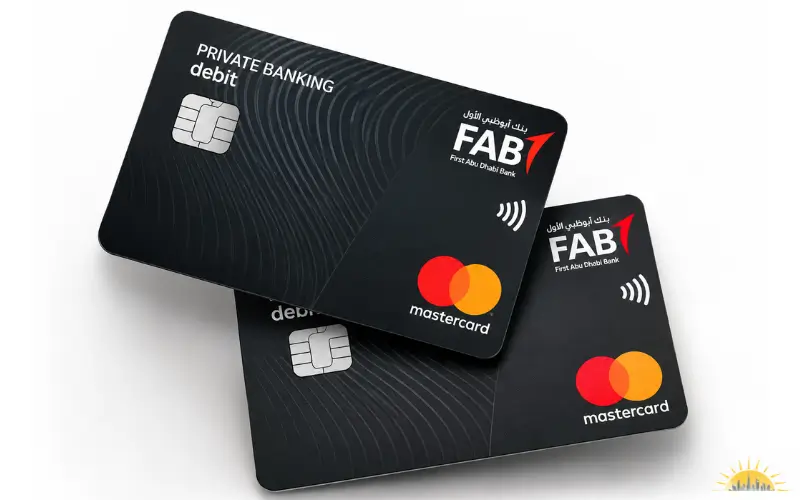
The first field asks for the final four digits of your card number. Look at your physical card, check the numbers, and enter the last four digits in the field provided.
Do not enter your full card number in this field. The form specifically asks for the final four digits, so entering additional numbers may cause the enquiry to fail.
Step 3: Enter Your Card ID
The next field asks for your card identification. This is a distinct identifier;r it is not simply another way to enter your card number. The form contains separate fields for the last four digits of the card and the card ID; therefore, you must provide the correct information for both.
Please refer to the documentation provided with your prepaid card or the official information supplied by your employer. If you are unable to identify the card ID, contact the card issuer or Ratibi support to inquire about how to obtain it. Do not enter your bank account number, Emirates ID, or any other number you might have guessed.
The public enquiry form does not specify one universal place where every cardholder can find the Card ID. Its location or format may depend on the card documentation.
Step 4: Complete the CAPTCHA
This form displays a ‘CAPTCHA‘ image to verify that the person submitting the inquiry is a real human being. Enter the characters shown in the image into the corresponding field.
If the characters are difficult to read, refresh the ‘CAPTCHA’ (provided this option is available on the page). Before proceeding to the next step, carefully review the data you have entered, as the form will not accept your submission if any character has been typed incorrectly.
Step 5: Submit the Enquiry
Select ‘Go‘ to submit your details. The portal will process this information and, if the inquiry matches an eligible card, it will display the response.
If the request fails, please verify the last four digits, the Card ID, and the CAPTCHA before trying again. If these details are correct but the portal still rejects the request, please contact the card issuer instead of repeatedly submitting the same information.
Security note: The visible Magnati form asks for the last four card digits, Card ID, and CAPTCHA. It does not request your full card number in those fields. Never give your PIN, online banking password,d or OTP to an unofficial website or anyone offering to check your balance.
Also Explore: Hafilat Card Balance Check
What Is PPC and Why Does It Use Magnati?
In this context, ‘PPC’ refers to ‘prepaid card’ services. Funds are loaded onto a prepaid card through an approved payment or payroll system, and the cardholder can spend or withdraw the available funds using various supported services. This does not necessarily require a traditional current or savings account.
Magnati provides a separate inquiry form for eligible prepaid cards. For this reason, ‘Ratibi’ cardholders may be directed to the Magnati website instead of using FAB’s standard personal banking login.
This service is not automatically available for every prepaid card. The card issuer and the terms of the relevant program determine which method a user can employ to access information.
PPC Card vs Regular Bank Account
Funds are held within a bank account either a current or a savings account. A prepaid card allows the cardholder to access the funds loaded onto the card, subject to the terms and conditions of the specific program associated with that card. Although both products provide users with access to funds, they do not necessarily utilize the same banking services.
Individuals with standard bank accounts can typically view their account balances through the bank’s mobile application or online banking website. In contrast, prepaid cardholders may need to use a specific portal—designed to provide information related to the card for this purpose.
A payroll card does not automatically provide an employee with a traditional bank account. An individual who receives their wages through ‘Ratibi’ can use this prepaid card without opening a formal current account, provided they meet the program’s requirements.
Does Every FAB Prepaid Card Use Magnati?
No, a prepaid card issued by FAB is not automatically eligible for every service on the Magnati portal. FAB specifically directs existing Ratibi cardholders to its own prepaid card inquiry service, while eligibility for other cards depends on the issuer and the specific card program.
If the portal does not recognize your card, please check the product information or contact the issuer. A failed inquiry attempt alone does not confirm that the card has been blocked, cancelled, or deactivated.
Ratibi Salary Card Balance Check
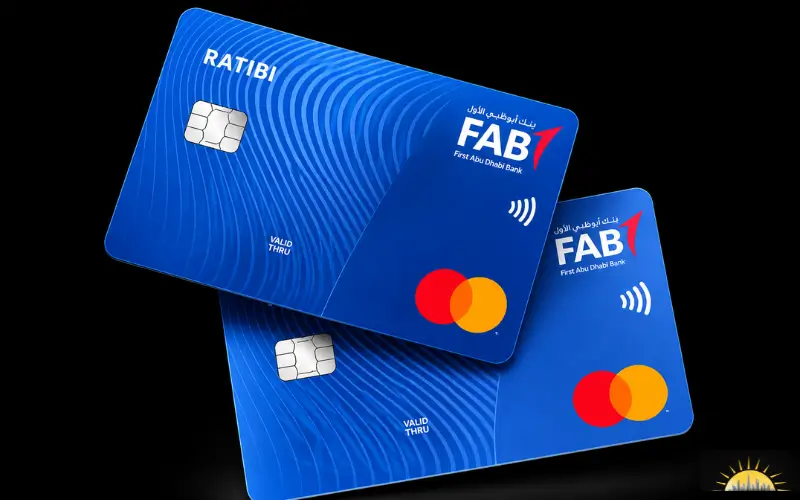
Ratibi is a payroll prepaid card offered by First Abu Dhabi Bank (FAB). Employers use this program to pay eligible employees, who can receive their wages on the card without needing to open a traditional bank account.
FAB describes the Ratibi card as a solution for employees earning up to AED 5,000. The bank also notes that cardholders are not required to maintain a minimum balance and do not incur monthly charges. Existing Ratibi users can access a dedicated balance inquiry service via the official FAB product page.
How Does a Ratibi Salary Card Work?
The employer manages the Ratibi program with FAB and provides prepaid cards to eligible employees. The employer also handles the relevant payroll arrangements and supplies the information required to process employee payments.
FAB supports salary payments through the UAE Wages Protection System (WPS). Its Ratibi documentation also outlines an option for non-WPS salary payments for corporate clients. The specific arrangement depends on the employer’s payroll setup.
Once the salary is credited to the card, employees can access the available funds through various channels. The FAB card offers features such as ATM access, in-store purchases, online payments, and usage via the Visa or Mastercard networks.
FAB also provides free SMS alerts whenever a salary is credited to the ‘Ratibi‘ account. According to FAB, there is no minimum balance requirement or monthly fee for cardholders. However, terms and conditions for other types of transactions may still apply; therefore, please review the relevant terms and conditions for the card before using the service.
How to Check Your Ratibi Card Balance
Existing cardholders can get started via the ‘Ratibi balance enquiry’ link available on FAB’s official website. This link directs users to an inquiry service for prepaid cards, where a form is used to request information regarding the card.
- Open the official FAB Ratibi page.
- Select the Ratibi prepaid card balance enquiry link.
- Open the Magnati enquiry portal.
- Enter the last four digits of your card.
- Type the Card ID associated with your prepaid card.
- Complete the CAPTCHA and select Go.
If you are unable to open the portal or do not know your ‘Card ID’, please contact the ‘Ratibi’ support team. You can find telephone numbers for the United Arab Emirates and other international locations in the ‘Customer Support’ section of this article.
Does Ratibi Send Salary SMS Alerts?
Yes. As part of the ‘Ratibi‘ card facility, FAB provides free SMS alerts whenever a salary is received. Through this notification, cardholders are informed that the salary sent by their employer has been credited to their card.
A salary credit alert is different from a ‘balance inquiry’ (i.e., checking your balance when needed). Receiving a salary credit notification does not mean you can check your current balance by sending a separate text message.
Do not use SMS codes found on unverified websites unless FAB has confirmed that such a service is available for your card. It is safer to use the ‘Magnati’ portal or another channel approved by the bank to check your available balance.
Can You Receive a Salary on Ratibi Without a Bank Account?
Yes, Ratibi allows eligible employees to receive their wages on a prepaid card without needing to open a traditional current or savings account. The employer must arrange a payroll program with FAB and meet the bank’s requirements.
FAB requires the employer to hold a corporate account with the bank. Furthermore, the employee must be a resident of the United Arab Emirates, and all required ‘KYC’ (Know Your Customer) information must be complete and up to date.
Employees who have questions regarding eligibility, card issuance, or participation in the payroll system should first consult their employer. The employer manages the program and serves as the point of contact between the employees and the bank.
Check Your FAB Account Balance Through Mobile Banking
Customers who hold current or savings accounts with FAB can use the FAB mobile application to check their balances and review recent transactions. The app also provides access to account statements, IBAN details, and various other features related to card management.
This facility is available to eligible Personal Banking customers. Holders of ‘Ratibi’ cards should follow the prescribed procedures to access information regarding their prepaid cards, unless an alternative method of access has been provided by FAB or their employer.
How to Check Your Balance Through FAB Mobile
- Download the official FAB Mobile application from the Apple App Store, Google Play Store, or Huawei AppGallery.
- Open the application and follow the registration instructions shown on the screen.
- Complete the identity and security checks requested by FAB.
- Sign in using the authentication method set up for your account.
- Select the current or savings account you want to check.
- Review the displayed balance and recent transactions.
When FAB releases an update, the app’s layout and registration steps may change. Therefore, rather than relying on screenshots or outdated tutorials, please follow the latest instructions provided within the official application.
According to information regarding FAB’s mobile banking, existing customers may need their ‘Customer Number’ (sent by the bank to their registered email address) or their debit/credit card number. During the registration process, verification of an ‘Emirates ID’ and a ‘video selfie’ may also be required.
What Can You Do Through FAB Mobile?
FAB Mobile provides users with access to various banking services, beyond simply checking their account balance. The available features depend on the products linked to the user’s profile.
Customers can use the application to:
- View account balances and transaction details.
- Download transaction history and electronic statements.
- Check IBAN information and account documents.
- Manage debit and credit cards.
- Activate, freeze, or request replacement cards where supported.
- Manage card PIN and spending controls.
- Make transfers and bill payments.
- Add and manage beneficiaries.
- Use fingerprint or Face ID login on compatible devices.
- Submit service requests and contact customer support.
Some services may have separate eligibility requirements or charges. Before confirming a payment or request, review the information displayed in the app.
Can Ratibi Cardholders Use FAB Mobile?
‘Ratibi‘ is a prepaid method for salary disbursement; therefore, cardholders should not expect the balance to appear automatically in the same way it would for a current or savings account.
FAB provides a separate link for existing ‘Ratibi‘ users to check their balance. Please use this service, unless the bank or your employer has provided you with access to an alternative digital option for managing your card.
This distinction is important because holding a ‘Ratibi’ card does not automatically mean that you have a regular personal bank account with FAB. The services available to you depend on this specific product and the access arrangements associated with it.

FAB Online Banking Login and Account Access
Eligible FAB customers can use online banking via the bank’s official website. This service provides access to banking facilities through a web browser, while the ‘FAB Mobile’ smartphone application offers similar access.
Customers who still have old banking ‘bookmarks’ saved should start from FAB’s current website. This helps avoid outdated (inactive) login pages and unofficial websites that might appear in search results.
What If Your Old Banking Login Does Not Work?
An old username, saved password, or bookmarked address may no longer lead you to the correct login service. Rather than trying various outdated links, start fresh from the current FAB website and access the official login page.
If FAB does not accept the credentials you have provided, follow the instructions on the website for password recovery or account access. Do not create a new banking profile simply because a previous login attempt failed, as this could cause confusion regarding your existing customer details.
If you are unable to determine your current customer number or cannot verify which account your previous credentials are linked to, please contact FAB through an official support channel. Have your registered mobile number and email address on hand, as the bank may use them during the identity verification process.
FAB Mobile and Online Banking: What Is the Difference?
FAB Mobile is a smartphone application, whereas Online Banking is accessed via a web browser on FAB’s official website. Although both provide digital access, the methods for logging in and authorizing transactions differ between the two.
According to information provided by FAB, users of Online Banking may be required to register for FAB Mobile and authorize certain types of transactions through this app. Therefore, an existing Online Banking username alone may not be sufficient to complete all types of transactions.
If FAB asks you to register for mobile verification, download the official application and follow the bank’s established identity verification procedures. Avoid using third-party registration links or sharing verification codes with anyone.
Can You Check Your Balance at an ATM?
Yes. Eligible cards can be used at supported ATMs for the services available on the card and network. FAB confirms that Ratibi cards can be used at ATMs and that cardholders can select their PIN through FAB ATMs.
An ATM can help when you do not have access to a smartphone or internet connection. However, the available enquiry options may differ according to the card type and ATM operator.
How to Check Your Balance at an ATM
- Visit an ATM that supports your card.
- Insert the card and follow the instructions on the screen.
- Enter your PIN when the machine requests it.
- Select the balance enquiry option if the ATM provides it.
- Review the displayed balance and any fee notice before proceeding.
- Collect your card and receipt before leaving.
The menu wording and position of the balance enquiry option can vary between machines. Some ATMs may not provide every service for every prepaid card, so check the available options before continuing.
Can You Check a Ratibi Balance at Any ATM?
FAB confirms that Ratibi cards can be used at ATMs; however, this does not mean that every machine offers the same balance inquiry service. The available options depend on the specific ATM and the card network.
Before proceeding with an inquiry, please read any fee notices displayed on the screen. Charges and transaction terms may vary when using an ATM outside of the FAB network; therefore, if you are unsure, please check the applicable card terms and conditions.
If an ATM retains your ‘Ratibi’ card, contact both your employer and the bank. According to information from FAB regarding ‘Ratibi’, a card confiscated by an ATM may be destroyed; in such a case, your employer will need to submit a request to obtain a replacement card.
SMS Alerts and Phone Banking
SMS alerts can help users keep track of important account or card activity. For Ratibi, FAB specifically provides free notifications whenever a salary is credited to the card.
These notifications do not automatically constitute an on-demand balance inquiry service. If a third-party website lists an SMS number or message format for checking your card, please verify the service with FAB before using it or sharing any personal information.
Phone support can assist if an online inquiry fails, for instance, if the portal does not recognize a card, or if a customer is unsure which service to use. Ratibi cardholders may use the UAE or international support numbers published by FAB.
Why Is Your Prepaid Card Balance Not Showing?
A failed inquiry (request/check) does not necessarily mean that the card has stopped working. This issue could be caused by an incorrect card number, a mismatch in the Card ID, a CAPTCHA error, a temporary issue with the website, or a failure in the payment reaching the card.
Before contacting the support team, check at which stage the process is stalling. The table below outlines common issues and the steps to resolve them.
| Problem | What may be wrong | Recommended action |
| Incorrect Card ID | The identifier does not match the card | Check card documents or contact support |
| Wrong last four digits | The card number was entered incorrectly | Recheck the physical card |
| CAPTCHA error | The verification characters were entered incorrectly | Refresh and retry |
| Portal not loading | Browser or connection problem | Try another browser or stable connection |
| Card not recognised | Card details or eligibility may need checking | Contact the issuer |
| Salary not showing | Payroll payment may not have reached the card | Ask the employer to verify payment |
| FAB Mobile login failure | Registration or authentication problem | Follow the official recovery process |
| ATM and app balances differ | Transactions or posting information may differ | Review transaction details and contact FAB |
What to Do When the Magnati Portal Is Not Working
First, ensure that you have opened Magnati’s official inquiry page. Rather than relying solely on the page’s design, check the website address (URL), as unofficial websites may also use similar text and branding.
Verify the last four digits of the card and the ‘Card ID,’ then re-enter the CAPTCHA. If the page fails to load, try using a different browser or ensure your internet connection is stable. If the website is temporarily unavailable, you may try again later.
If the error persists even after verifying the information, please contact ‘Ratibi’ support or the institution that issued your card. Explain what happens when you submit an inquiry (request), and ask them to confirm whether your card is eligible for use on this portal. If anyone offers to fix the inquiry service or check your balance on your behalf, never share your PIN or OTP with them.
What If the Card ID Is Not Working?
The Card ID and card number are separate details. The Magnati form asks for the last four card digits in one field and the Card ID in another, so entering the same numbers in both fields will not complete the enquiry correctly.
Check the documents supplied with your card or the official information provided by your employer. If you still cannot identify the Card ID, ask the issuer or Ratibi support team to help you retrieve the correct details.
Do not guess the identifier or use another employee’s Card ID. The information must match your own card for the enquiry to work.
What If Your Salary Has Not Appeared?
First, check with your employer’s payroll department to see if they have completed the salary payment process. Verify the expected payment date and amount, and ask the employer to confirm that the correct card details were used.
If the employer confirms that the payment process has been completed, contact ‘Ratibi’ support and inform them that the funds are not appearing on your card. Provide the necessary payment-related information through the bank’s verified support channels.
In the context of the ‘Ratibi’ program, FAB considers employers to be the point of contact between employees and the bank. Therefore, if any issues arise regarding payroll submission, employee details, or card issuance, the employer should be involved in the process.
Do not assume that every delay is caused by the mobile application or the ‘Magnati’ portal; the issue may have originated before the payment even reached the payment card.
What If Your Card Is Blocked, Expired or Lost?
A blocked, expired, or lost card needs attention from the bank or programme administrator. A routine balance enquiry will not resolve a card that has been stopped or can no longer be used.
Contact the bank through an official support channel and explain whether the card is lost, damaged, expired, retained by an ATM, or rejected during a transaction. Ratibi cardholders should also inform their employer because the employer manages the payroll card programme and may need to arrange a replacement.
If you suspect someone has used your card without permission, report the issue immediately. Do not wait for your next salary payment or continue trying transactions on a card you believe may be compromised.
Can You Check Your Balance Outside the UAE?
FAB confirms that customers can access FAB Mobile from outside the UAE via Wi-Fi or mobile roaming data, provided they complete the required authentication. This allows eligible account holders to review their banking information while traveling or residing abroad.
FAB also notes that Ratibi cards can be used globally through supported Visa or Mastercard networks, subject to the card’s terms and conditions and the network’s acceptance. International access to the app and international card payments are separate services; therefore, the availability of one does not guarantee the other.
For prepaid card inquiries while abroad, please access the official Magnati portal and follow the same steps used within the UAE. If you are unable to complete your request, please contact Ratibi support using the international number provided below.
Card controls, network availability, and transaction conditions may affect international payments or cash withdrawals. Please review the card terms and conditions, or contact FAB if you require further clarification before using your card abroad.
FAB and Ratibi Customer Support Numbers
If you are unable to complete a transaction, your card is not being accepted, or you require assistance regarding salary payments, please contact FAB. ‘Ratibi‘ customers may use the specific telephone numbers provided on the bank’s official website.
| Support channel | Official number |
| Ratibi support within the UAE | 600 522 298 |
| Ratibi support outside the UAE | +971 2 499 6279 |
You can verify these details on the official FAB Contact and Support page. If you are calling from outside the UAE, use the international number rather than the local contact number.
What Information Should You Keep Ready?
Before calling, have the details regarding your issue ready. Providing accurate information helps the support team understand the problem, and it prevents them from having to ask you for the same details repeatedly.
Keep the following information ready:
- Your card type, such as Ratibi or another prepaid card.
- The last four digits of your card.
- The date and amount of the salary or transaction in question.
- The exact error displayed by the enquiry portal or banking application.
- Your employer’s payroll confirmation, if the issue concerns a salary payment.
Share personal banking information only through the bank’s verified channels. FAB may need to confirm your identity, but you should never disclose your PIN, password, or OTP to a support representative or anyone else.
Security Tips for Online Balance Enquiry
When checking your account or prepaid card, use FAB’s official website, the FAB mobile application, or the Magnati portal. Carefully verify the website address before entering any card information—especially if you arrived at the page via a search result, email, or message.
Avoid clicking on links sent by unknown individuals via WhatsApp, SMS, or social media. A webpage does not become an authorized banking service simply because it features bank-related terminology, colors, or logos. If you are unsure about a link, access the bank’s website directly.
Keep your PIN, password, and OTP confidential. Even if someone claims to be a bank representative, never disclose these details, not even for a routine balance inquiry. Do not send photos of your card or banking details to anyone offering assistance through unofficial channels.
Do not save your banking details when using a shared computer, and always sign out after ending your session. Keep your phone’s operating system and banking application updated, and utilize the security options provided by FAB.
If you notice an unfamiliar transaction or suspect unauthorised access, contact the bank immediately through its verified support channels. Ask the bank to secure the affected card or account and follow its instructions.
Conclusion
The correct balance inquiry method depends on whether you hold a regular bank account, a Ratibi payroll card, or another eligible prepaid card. Holders of regular FAB accounts can use FAB Mobile or online banking, while holders of eligible prepaid cards can check their funds via the official Magnati portal.
If the portal rejects your details, fails to recognize your card, or does not display your salary, please verify the information and, if necessary, contact your bank or employer. Always use authorized banking channels, and keep your PIN, password, and OTP private whenever you check your balance.
Also Explore: FAB iSave Account
Frequently Asked Questions
How can I check my NBAD balance online?
The correct method depends on the account or card you hold. Regular account holders can use FAB Mobile or online banking, while eligible prepaid cardholders can check their funds via the official Magnati inquiry portal.
Is NBAD still a separate bank?
No. In 2017, the National Bank of Abu Dhabi merged with the First Gulf Bank, resulting in the formation of ‘First Abu Dhabi Bank’ (FAB). This combined entity now operates under the name ‘FAB’, and customers should utilize its current, official banking services.
What is the official prepaid card enquiry website?
The official portal for obtaining information regarding Magnati prepaid cards is https://ppc.magnati.com/ppc-inquiry/. This portal is intended for specific prepaid cards; therefore, before submitting your details, please verify that your card is covered by this service.
What details are required for a Magnati balance enquiry?
The form provided asks for the last four digits of your card number, a separate ‘Card ID’, and a ‘CAPTCHA’ verification. It does not request the full card number.
Is Card ID the same as the card number?
No. Card ID is a separate identifier linked to the prepaid card. The Magnati form has one field for the last four card digits and another for the Card ID, so you need both details.
Can I check my Ratibi salary card without a bank account?
Yes. Ratibi allows eligible employees to receive their wages on a prepaid card without opening a conventional current or savings account. Existing cardholders can use the dedicated balance enquiry service.
Does FAB provide an SMS balance-check code for Ratibi?
FAB confirms that Ratibi cardholders receive free SMS alerts whenever their salary is credited. This does not confirm the availability of on-demand SMS balance inquiries; therefore, please check with FAB before using any codes published on third-party websites.
What should I do if my salary is missing from my Ratibi card?
Verify with your employer’s payroll department that they have processed the payment and used the correct card details. If the employer confirms the transfer, contact ‘Ratibi’ support and provide payment-related information obtained from an official or authorized source.